VSCXML Generator
The VSCXML Generator transforms W3C SCXML state machine definitions into production-ready, optimized native code for Java, JavaScript, C#, C, Python, Go, and Structured Text (IEC 61131-3). Available for Windows, macOS, and Linux.
The generator comes in two forms:
- VSCXML-Generator-CLI — Command-line tool with the
scxml-gencommand - VSCXML-Generator — Visual desktop app with a graphical interface
Installation
Download the installer for your platform:
| Platform | Download | Requirements |
|---|---|---|
| Windows | VSCXML Generator Setup.exe | Windows 10/11 |
| macOS | VSCXML Generator.dmg | macOS 11+ |
| Linux | vscxml-generator.AppImage | Any modern Linux distro |
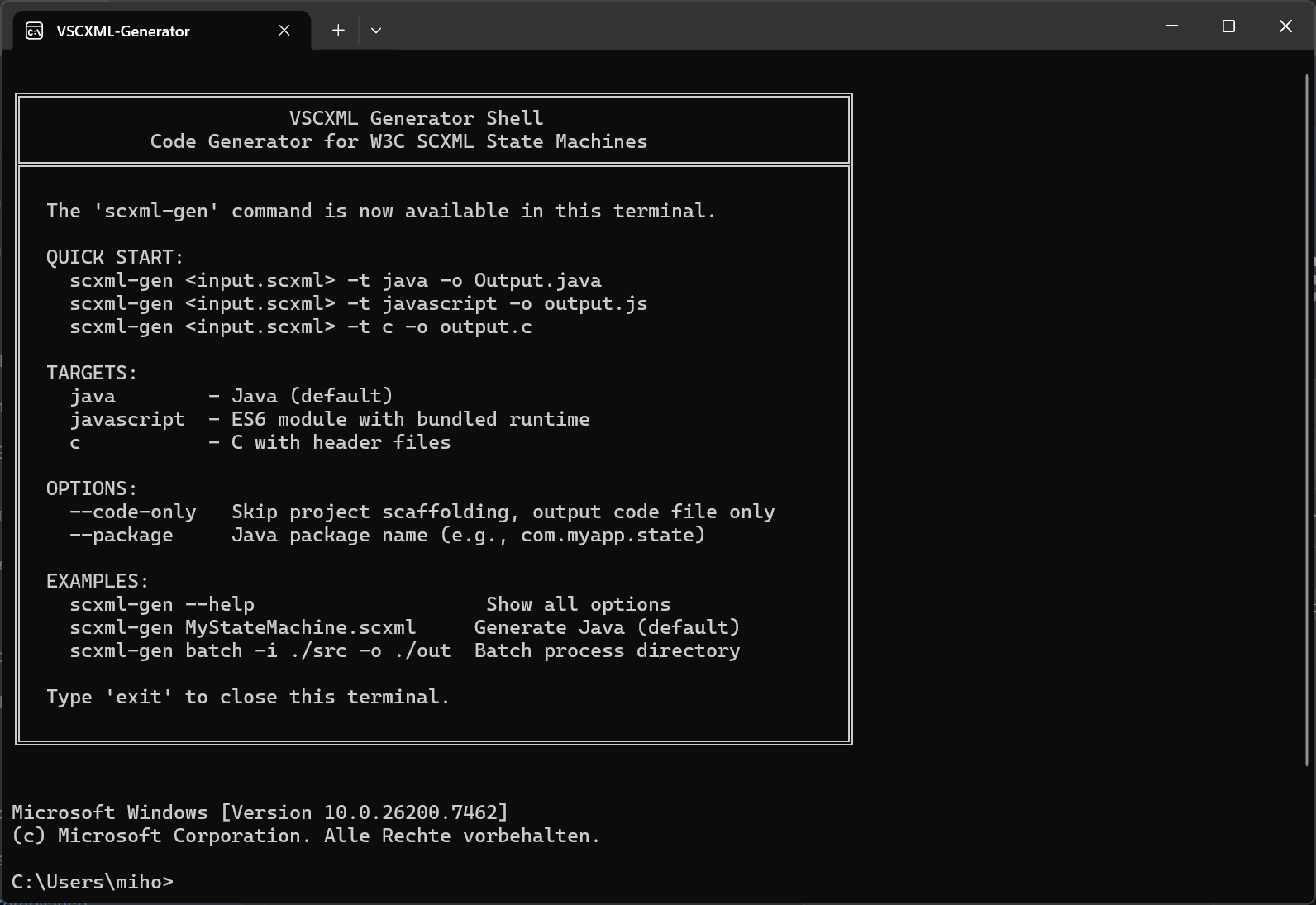
After installation, the generator appears in your system's application menu as VSCXML Generator. It opens a terminal shell with the scxml-gen command pre-configured.
Quick Start
Launch the VSCXML Generator from your application menu. The shell displays a quick reference (see screenshot above)
Basic Usage
# Generate Java (default target)
scxml-gen traffic.scxml

# Generate Java with package name
scxml-gen traffic.scxml -t java -o TrafficLight.java --package com.myapp

# Generate JavaScript ES6 module
scxml-gen traffic.scxml -t javascript -o traffic.js

# Generate C# with namespace
scxml-gen traffic.scxml -t csharp -o TrafficLight.cs --namespace MyApp

# Generate C with header files
scxml-gen traffic.scxml -t c -o traffic.c

# Generate Python
scxml-gen traffic.scxml -t python -o traffic_light.py

# Generate Go
scxml-gen traffic.scxml -t go -o traffic_light.go

# Generate Structured Text (IEC 61131-3)
scxml-gen traffic.scxml -t st -o TrafficLight.st
Target Platforms
| Target | Alias | Output | Best For |
|---|---|---|---|
| java | - | .java class file |
Server applications, Android, enterprise systems |
| javascript | js | ES module .js |
Web browsers, Node.js, React/Vue apps |
| csharp | cs | .cs class file |
.NET applications, Unity games |
| c | - | .c + .h files |
Embedded systems, Arduino, ESP32, bare-metal |
| python | py | .py module |
Data science, scripting, automation |
| go | - | .go file |
Cloud services, microservices, CLI tools |
| st | - | .st file |
PLC programming, CODESYS, TwinCAT (IEC 61131-3) |
Each target is optimized for its platform with native idioms and zero unnecessary overhead. All targets achieve 100% W3C ECMAScript compliance (except ST, which uses null and native-st datamodels).
Command-Line Reference
Basic Syntax
scxml-gen [options] <input-file.scxml>Options
| Option | Description |
|---|---|
-t, --target <lang> |
Target: java (default), javascript (js), csharp (cs), c, python (py), go, st |
-o, --output <file> |
Output file path |
--package <name> |
Java package name |
--namespace <name> |
C# namespace |
--class <name> |
Override generated class name |
--code-only |
Source only, no project scaffolding |
--bundle <file> |
Bundle external invoke children |
--bundle-auto |
Auto-discover and bundle all invoke children |
--bundle-runtime |
Copy runtime library to output directory |
--amalgamate |
(C only) Single-header runtime |
-q, --quiet |
Suppress output |
-h, --help |
Show help |
Batch Processing
Process multiple SCXML files in a directory:
scxml-gen batch -i ./src -o ./outExamples
# Java with package
scxml-gen workflow.scxml -o Workflow.java --package com.myapp.workflow

# JavaScript ES module
scxml-gen game.scxml -t javascript -o game.js

# C# with namespace
scxml-gen controller.scxml -t csharp -o Controller.cs --namespace MyApp.Controllers

# C for embedded (code only, no scaffolding)
scxml-gen controller.scxml -t c --code-only -o controller.c

# Python with bundled runtime
scxml-gen workflow.scxml -t python -o workflow.py --bundle-runtime

# Go
scxml-gen service.scxml -t go -o service.go

# Bundle invoke children automatically
scxml-gen parent.scxml -t javascript -o Parent.js --bundle-auto

# Bundle specific children
scxml-gen parent.scxml -t c --bundle child1.scxml --bundle child2.scxml

# Show all options
scxml-gen --help
Generated Code Architecture
The generator produces transpiled state machines—not interpreted SCXML at runtime. This means:
- No runtime parsing - SCXML is compiled away at build time
- Type-safe code - Generated code uses proper types for each platform
- Optimal performance - Direct state transitions, no XML processing
- Small footprint - Only the code you need, nothing extra
┌──────────────────────┐
│   traffic.scxml      │
│   (Source)           │
└──────────┬───────────┘
           │  scxml-gen -t java
           ▼
┌──────────────────────┐
│  TrafficLight.java   │
│  - No SCXML parsing  │
│  - Direct dispatch   │
│  - Native types      │
└──────────────────────┘
Java Target
Generated API
import com.example.TrafficLight;

// Create and start
TrafficLight sm = new TrafficLight();
sm.start();

// Send events
sm.send(TrafficLight.EVT_TIMER);
sm.send(TrafficLight.EVT_EMERGENCY);

// Query state
if (sm.isInState("red")) {
    System.out.println("Stop!");
}

// Access datamodel
int count = sm.getCounter();
Runtime Library
For ECMAScript datamodel, add a JavaScript engine:
dependencies {
    // Choose one:
    implementation 'org.mozilla:rhino:1.7.15'       // Rhino
    implementation 'org.graalvm.polyglot:js:24.0.0' // GraalJS (for Native Image)
}
See Java Target Guide for complete documentation.
JavaScript Target
Generated API
import { TrafficLight } from './traffic.js';

// Create and start
const sm = new TrafficLight();
sm.setLogger((msg) => console.log('[SM]', msg));
sm.start();

// Send events
sm.send('timer');
sm.send('emergency');

// Query state
if (sm.isInState('red')) {
    console.log('Stop!');
}

// Access datamodel
console.log(sm.data.counter);
See JavaScript Target Guide for complete documentation.
C# Target
Generated API
using MyNamespace;

// Create and start
var sm = new TrafficLight();
sm.Start();

// Send events
sm.Send("timer");
sm.Send("emergency");

// Query state
if (sm.IsInState("red")) {
    Console.WriteLine("Stop!");
}

// Access datamodel
Console.WriteLine(sm.Counter);
Runtime Library
For ECMAScript datamodel, add the Jint NuGet package:
<PackageReference Include="ScxmlGen.Runtime" Version="1.0.0" />
<PackageReference Include="Jint" Version="3.1.6" />
See C# Target Guide for complete documentation.
C Target
Generated API
#include "traffic.h"

int main() {
    TrafficLight sm;
    TrafficLight_init(&sm);
    TrafficLight_start(&sm);

    // Send events (O(1) dispatch with generated constants)
    TrafficLight_send(&sm, EVT_TIMER, NULL);
    TrafficLight_send(&sm, EVT_EMERGENCY, NULL);

    // Query state
    if (TrafficLight_is_in(&sm, S_RED)) {
        printf("Stop!\n");
    }

    return 0;
}
Memory Model
The C target is designed for resource-constrained environments:
| Feature | Implementation |
|---|---|
| No heap allocation | All state stored in static struct |
| Fixed-size buffers | Event queue size defined at compile time |
| No dynamic strings | All strings are compile-time constants |
| Minimal footprint | Typical state machine: 200-500 bytes RAM |
See C Target Guide for complete documentation.
Python Target
Generated API
from traffic_light import TrafficLight

# Create and start
sm = TrafficLight()
sm.start()

# Send events
sm.send("timer")
sm.send("emergency")

# Query state
if sm.is_in_state("red"):
    print("Stop!")

# Access datamodel
print(sm.counter)
Runtime Library
For ECMAScript datamodel, install dukpy:
pip install scxmlgen        # Runtime library
pip install dukpy>=0.3.0    # ECMAScript engine
See Python Target Guide for complete documentation.
Go Target
Generated API
import "github.com/scxmlgen/scxmlgen"

// Create and start
sm := NewTrafficLight()
sm.Start()

// Send events
sm.Send(scxmlgen.NewEvent("timer"))
sm.Send(scxmlgen.NewEvent("emergency"))

// Query state
if sm.IsInState("red") {
    fmt.Println("Stop!")
}

// Access datamodel
fmt.Println(sm.Counter)
Runtime Library
For ECMAScript datamodel, install goja:
go get github.com/scxmlgen/scxmlgen    # Runtime library
go get github.com/dop251/goja          # ECMAScript engine
See Go Target Guide for complete documentation.
Structured Text Target
Generated API
PROGRAM Main
VAR
    sm : TrafficLight;
END_VAR

// Start
sm.start := TRUE;
sm();
sm.start := FALSE;

// Send events
sm.event := TrafficLight_Events.EVT_TIMER;
sm();
sm.event := TrafficLight_Events.EVT_NONE;

// Query state
sm.stateQuery := TrafficLight_States.S_RED;
sm();
IF sm.queryResult THEN
    // State is active
END_IF
PLC Platform Options
# Standard (CODESYS 3rd edition, methods inside FUNCTION_BLOCK)
scxml-gen machine.scxml -t st -o Machine.st

# IEC-strict (no vendor pragmas or access modifiers)
scxml-gen machine.scxml -t st -o Machine.st --plc-platform iec-strict

# OpenPLC / 2nd edition (standalone FUNCTIONs, portable)
scxml-gen machine.scxml -t st -o Machine.st --plc-platform openplc
See Structured Text Target Guide for complete documentation.
VSCXML-Generator Desktop App
The VSCXML-Generator is a visual desktop application that provides the same code generation capabilities as the CLI but with a graphical interface.
Features
- Built-in SCXML editor with syntax highlighting (Monaco editor)
- Visual target selection — Choose from all 7 targets with a dropdown
- Live code preview — See generated code as you edit
- Project generation — Complete runnable projects with one click
- Multiple output formats — Individual files or ZIP archives
How to Use
- Launch VSCXML-Generator from your application menu
- Open or paste your SCXML source
- Select a target language
- Configure options (package name, namespace, etc.)
- Click Generate to produce the code
The desktop app automatically manages the VSCXML-Generator-CLI server in the background. No manual server setup required.
AI Integration (MCP)
The Generator is also accessible via the VSCXML MCP Server, enabling AI assistants to generate code directly:
User: "Generate a complete Java project and a Python project for this state machine"

Claude (via MCP):
1. scxml_generate_project(target="java", ...)
2. scxml_generate_project(target="python", ...)
Install the MCP server for Claude Code:
claude mcp add vscxml -- npx -y @vscxml/mcpInvoke Bundling
For state machines that use <invoke> to spawn child machines, bundle them at compile time:
Automatic Bundling
scxml-gen parent.scxml -t javascript --bundle-auto -o parent.jsThe generator finds all <invoke src="..."> references and bundles them.
Manual Bundling
scxml-gen parent.scxml -t c \
    --bundle child1.scxml \
    --bundle child2.scxml \
    -o parent.c
Benefits of Bundling
- Single output file - No external file dependencies
- No runtime parsing - Children are compiled, not interpreted
- Works offline - Perfect for embedded systems
- Faster startup - No file I/O at runtime
Datamodels
The datamodel attribute determines how expressions are evaluated:
| Datamodel | Expressions | Best For |
|---|---|---|
null |
None (only In() predicate) |
Simple logic, maximum portability |
ecmascript |
Full JavaScript | Complex scripting, dynamic behavior |
native-java |
Java types | Type-safe Java applications |
native-js |
JavaScript objects | Native JS performance |
native-csharp |
C# types with LINQ | Type-safe .NET applications |
native-c |
C variables | Embedded systems, minimal overhead |
native-python |
Python with type hints | Type-safe Python applications |
native-go |
Go types | Type-safe Go applications |
See Datamodels Guide for detailed comparison.
Workflow Integration
The Generator is the final step in the vscxml workflow:
┌─────────────────┐     ┌─────────────────┐     ┌─────────────────┐
│  SCXML Editor   │────▶│    Simulator    │────▶│    Generator    │
│  (Design)       │     │  (Test & Debug) │     │  (Build Code)   │
└─────────────────┘     └─────────────────┘     └─────────────────┘
                                                        │
              ┌──────────┬──────────┬──────────┬────────┼────────┬──────────┬──────────┐
              ▼          ▼          ▼          ▼        ▼        ▼          ▼          ▼
         ┌─────────┐ ┌─────────┐ ┌─────────┐ ┌─────────┐ ┌─────────┐ ┌─────────┐ ┌─────────┐
         │  .java  │ │   .js   │ │   .cs   │ │   .c    │ │   .py   │ │   .go   │ │   .st   │
         │  files  │ │  files  │ │  files  │ │  files  │ │  files  │ │  files  │ │  files  │
└─────────┘ └─────────┘ └─────────┘ └─────────┘ └─────────┘ └─────────┘ └─────────┘W3C Compliance
The generator produces code that is 100% compliant with the W3C SCXML specification for the ECMAScript datamodel:
- All 181 W3C test cases pass
- Proper event processing semantics
- Correct conflict resolution
- Full support for parallel states, history, invoke
See W3C Compliance Report for detailed test results.
Tips & Best Practices
Use null datamodel for portability - If you don't need expressions,
nullworks identically on all targetsBundle invoke children - Always use
--bundle-autofor deploymentsUse
--code-onlyfor integration into existing projectsMatch target to platform - Use C for embedded, Java for servers, JS for web
Test before generating - Run through the Simulator first to catch logic errors
Next Steps
- Editor Guide — Design state machines visually
- Simulator Guide — Test and debug interactively
- MCP Setup Guide — AI integration with Claude Code
- Traffic Light Tutorial — Interactive step-by-step example
- Java Target — Complete Java documentation
- JavaScript Target — Complete JavaScript documentation
- C# Target — Complete C# documentation
- C Target — Complete C/Embedded documentation
- Python Target — Complete Python documentation
- Go Target — Complete Go documentation
- Structured Text Target — Complete IEC 61131-3 documentation